




Over the years, I’ve heard many customers ask how to setup a blog, an e-commerce shop and build a solid online business presence. As our world becomes increasingly digitized, these type of questions are becoming more common. To help you gain a following (and ultimately sell more goods),we’re introducing our Bramble Business Basics series. I hope these posts — which will cover topics such as marketing online, communicating with customers through a blog and developing a Twitter following — will help you build a solid foundation for your e-commerce business.
This post will give you an overview on how to set up an Etsy shop, which is an excellent way to break into the handcrafted online good market. Etsy is an online marketplace that sells handmade goods, vintage items and supplies. You can sell in handmade products and digital goods, and you can choose to offer coupons and sales as well. According to the Etsy blog, $100.9 million worth of goods were sold by Etsy sellers in July 2013. That’s means more than 4 million items were sold, and almost 3 million new items listed — and that’s just in one month! You can quickly see how having an Etsy shop opens you up to a wide world of potential customers. At any one time, we try to have a wide variety of cold process and melt & pour soaps in our own Etsy shop from tutorials on this blog.
ONE: Register
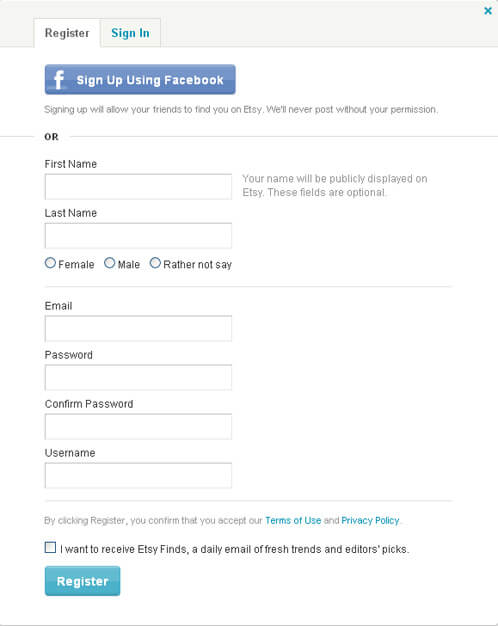
The first step in setting up a shop on Etsy is to register for an account. This is simple process, and looks the same as most website sign-ups. To start this process, click here. Remember that setting up an Etsy account does not mean you’ve set up a shop. This account is the first step in setting up an online storefront. To learn more about setting up shop, read on!
TWO: Selling
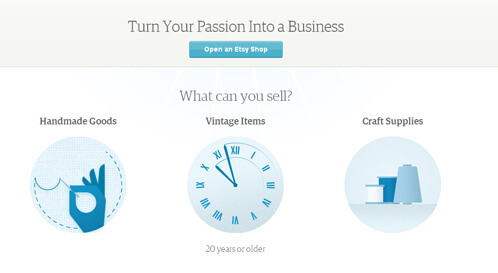
To get starting on selling your products on Etsy, make sure you have registered for your account and are signed in. Once you’ve done that, find the button at the top of the Etsy page that says Sell. Look over the page and when you are ready click the button at the top of the page that says ‘Open Up an Etsy Shop.’
THREE: Language and Currency
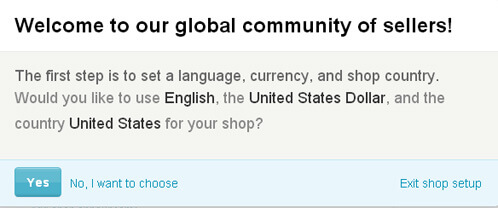
Once you’ve decided to open your first Etsy shop, it will ask you about your preferred language and currency. Go ahead and choose which ones work the best for you. Remember that whichever language you chose will be your shop’s default and you won’t be able to change it at a later point. Also, be sure to pick the correct country for your business as some Etsy seller tools are only available for certain countries.
FOUR: Set Up Shop
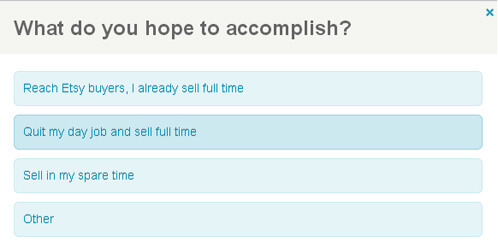
Once you’ve picked the correct settings (language and currency) for your shop you will be asked what you hope to accomplish by opening up your shop. This will let Etsy know what kind of tools and business you are looking to create. For the sake and easy of this tutorial I’ve picked the option that many soapers are hoping to achieve, ‘Quit my day job and sell full time’.
FIVE: Pick Your Shop Name
This is one of my favorite parts. If you already have a business or website name, you can use that here. But, if this is your first time opening up a shop you have a world of possibilities before you. Be sure to do some quick web searches before you decide on a name to make sure that nobody else has chosen the name you want for your business. You want to be able to have future and potential growth in your business so pick something that will allow you to grow. Also remember that you will want to take a look at the name you are choosing as it is written (it can only be one word for Etsy, without any spaces) and you will want to make sure it looks right. For instance soapqueen.com makes sense when you look at it, and you wouldn’t want to end up with something like penisland.net (a pen website) and have it read funny to your potential customers.This will be your permanent shop name and you won’t be able to change it later. Pick something that can represent your business and your soap. If you need other soapers to bounce some ideas off of, check out the Teach Soap Forums.
SIX: Branding & Look
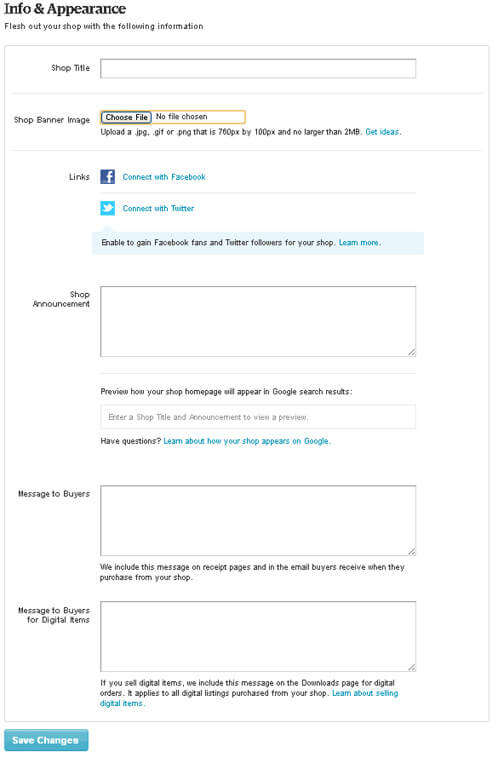
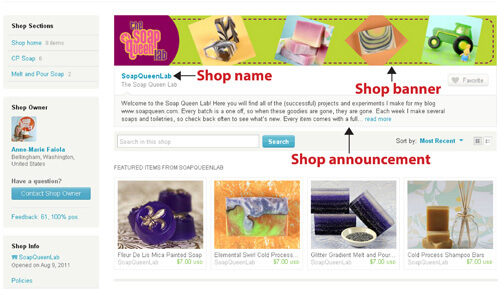
Now it’s time to customize your shop. Banners for your shop must run at a 760 x 100 pixel image size, be sure to create an image that fits within those parameters. A great free online tool for this is Pixlr. Pixlr allow you to size your images online and save them to your desktop for free. Be sure to include a shop announcement in your store. This helps to welcome buyers, promote products and sales and draw the shopper in. The last part of this you will need to work on is the shop title. Give a short description of the kind of products you offer. Be descriptive, be precise.
SEVEN: List Items
Now it is time to start listing your items. To start listing individual soaps, bath bombs, lotions and more, click here (make sure you are logged into your store account). The best advice I have for you here is to have great picture, that is going to be the first thing that draw a customer in your shop. You want to have good lighting, good backdrops and clear photography. To learn more about how to photograph your products, check out this blog post.
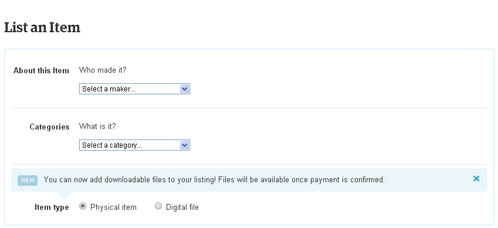
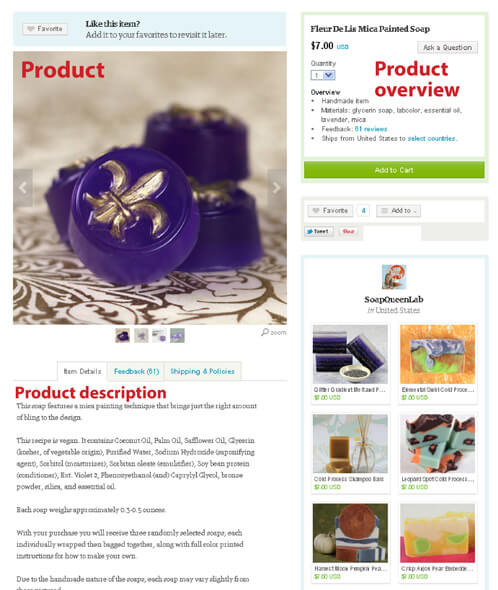
This is an individual product listing. It gives the name of the product, the price, the quantity and details about it (materials, ingredients, etc). The more information you list on a product the more likely a customer is to buy it. You will want to include a full ingredient list so that potential customers will know exactly what they are getting. One thing to remember about listing an item on Etsy is a listing fee. To list an item on Etsy, it costs $0.20 (twenty cents) when the listing is published. A listing will last for four months or until the item is sold. If after four months the item has not been sold, then the listing will expire. This is something important to remember when adding products to your Etsy shop.
EIGHT: Get Paid!
Once you’ve set your shop up, you need to decide how you want to get paid. The more options you offer, the more customers can purchase from you. Payment methods range anywhere from credit & debit cards to Paypal to bank transfers and even the brand new Etsy Gift Cards.
NINE: Billing
You are almost done! Depending on which country you live in, you may need a credit card to open shop. These cards can either be a Visa, MasterCard, American Express or even Discover. The reason that Etsy asks you to keep a credit card on file is for means of identity verification. They want to make sure that you are who you say you are!
You are done! You have now successfully opened up your very first Etsy shop. Share it with your friends and family, attach it to your e-mail signature, and put it on your business cards.
Features of Etsy:
- Coupons. You can now offer coupons in your Etsy stores, and there are three distinct ways to do so: Percent Discount, Free Shipping and Fixed Dollar Amount Discount. To add a coupon code to your shop, make sure it has been set to public and go to the “Your Shop” Tab. Under this tab, you will find a coupon codes button which will walk you through on creating your own coupons.
- Etsy Gift cards This is a new feature of Etsy. It allows anybody to buy an Etsy gift card so that they can shop anywhere on Etsy’s website, including your shop. When setting up your shop. They come in $25, $50, $100 and $250 amounts and can be used on any product or digital download on Etsy.
- Digital Goods. Are you selling a PDF to go with your project? Or even cute custom labels that you worked on to go with that special holiday set? Etsy now offers a way to sell these items as well. To list a digital item for sell start by going to your shop as you woulds normally do when selling a physical item. Describe the item and use the drop down menus to identify the type of product it is. Once you’ve finished that, you will have a chance to select the item type of the product, make sure that the Digital File option (below) is selected.

Once you’ve selected the item type it is time to upload your file to your Etsy shop. At this time, you can upload only five digital files per listing. Make sure that your file is within the maximum size (20 MB). Once you’ve uploaded your files, start listing your digital good as you would with any other product, give it a good description, well-done photographs and a catchy name. For tips on photographing your products, there’s a blog post here and here. Photography sells your products online. People can’t touch or smell your creations so make sure your photography is luscious and appealing.
- Etsy Wholesale. Are you a wholesaler? Etsy is starting to run a beta wholesale program for those that are interested. You will have a chance to have a private marketplace where buyers can discover hard-to-find and unique products from artists and designers. If you are interested in finding out more information about this new feature of Etsy, click here.
Tips & Tricks
- Setting up a Shipping Profile. Shipping profiles are optional ways to save a specific set of shipping information which you can apply to ANY item listing during the editing or listing process. To add or edit a shipping profile, go to ‘Your Shop’ and click on the ‘Shipping & Payment’ information. From there you will find an option that says ‘Shipping Profiles’. From there you can edit this information. Make sure that your shop is open to the public, as that is a prerequisite for working with this option. This is a great option along with copying items to save time when listing new products. The more time you save, the more time you have to produce your products!
- Copying Items. Do you have more than one item that you want to feature? Are the details of each product the same? This little tip will actually save you a lot of time when listing items in your shop. Copying a listing (item) can actually save you time if you have many similar type of products or if you use similar (or exact) information in your listing descriptions. Instead of retyping the information from scratch for each listing, you can actually copy a similar active or sold product and edit to reflect the changes. To copy a listing, head to shop. Once there, click on ‘Listing.’ Click on the active tab. Once there, click on the listing or product and click the copy link. That’s it! This is an easy trick to make listing your products much easier and faster. Just make sure to change the product name and details that need changing before posting it live in your shop.
Have you set up you business on Etsy? We’d love to hear from you the tips and tricks that you learned to make it easier.
